Duck Laser Engrave File: High-Resolution PNG for Laser Cutting
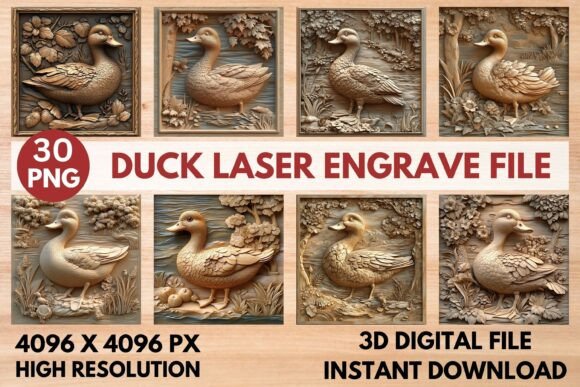
Imagine adding a touch of whimsical charm to your next laser project with a design that combines intricate detail and effortless style. The Duck Laser Engrave File offers just that—a versatile, high-resolution PNG set designed to bring a playful yet sophisticated element to your work. This isn't just a simple graphic; it's a carefully crafted tool for makers, designers, and crafters looking to produce professional-quality engravings with depth and character.
At its core, this asset is a premium design file optimized for laser engraving. It includes both coloring and grayscale PNG versions at a substantial 4096x4096 pixel resolution, ensuring your engravings are crisp and detailed, even when scaled for larger projects. The transparent background makes it simple to layer the duck motif onto various materials or combine it with other design elements. Whether you're working with a Glowforge, Lightburn, xTool, or a CO2 laser cutter, the file is prepared to deliver smooth gradations and clean lines, making it a valuable addition to your digital toolkit.
Creative Applications for Your Projects
The true appeal of this file lies in its flexibility. It’s far more than a one-note graphic; think of it as a creative springboard. Here are a few ways you can integrate this design into your work:
- Personalized Gifts & Home Decor: Engrave the duck onto wooden cutting boards, coasters, or decorative signs for a unique, handcrafted touch that stands out.
- Stationery & Packaging: Use the design to create distinctive branding elements for artisanal products, custom notebook covers, or elegant stationery sets.
- Fashion & Textiles: Apply the motif to leather goods, wooden buttons, or fabric patches for clothing and accessories with a custom, boutique feel.
- Tableware & Merchandise: Create stylish, engraved serving trays, slate cheese boards, or branded merchandise that tells a story.
The grayscale version is particularly useful for achieving a nuanced, photographic quality in your engravings, allowing for subtle shadows and highlights that a simple line art file can't provide.
Tips for Selecting and Using Laser Engrave Files
Choosing the right digital asset is about more than just the image. To ensure a smooth workflow and a polished final product, consider these practical points:
First, always check the file's compatibility with your software. This set is designed for popular programs like Lightburn and Glowforge's interface. Next, think about the material you're engraving. Lighter woods often yield the best contrast for grayscale engravings, as recommended with the file. Testing on a scrap piece of your chosen material is always a wise step to dial in the perfect speed and power settings for your machine.
Finally, consider the design's role in your broader project. A well-chosen graphic should complement your overall aesthetic. This duck design, with its balance of detail and charm, can serve as a focal point or a subtle accent, helping to create visual consistency and professional presentation across your creations.
Selecting a thoughtfully designed file like the Duck Laser Engrave File can significantly elevate your projects, turning ordinary items into memorable pieces. It provides the creative foundation to experiment, personalize, and produce work that truly resonates, making it a worthwhile consideration for any dedicated maker or designer.